Subscribe For Free Updates!

We'll not spam mate! We promise.

Saturday, April 5, 2014

What is Windows Task Manager?

What is Windows Task Manager?
Same word telling you that is manager of all applications,folders,processes
(what is happening on Windows)
It's like manager who tells you which applications are opened,RAM memory usage,CPU usage,how much users are on PC,network (adapter) speed,etc.
With Task Manager you can do almost everything!

What can i do with task manager?
Cannot pass a day without Task manager because all people using it.
With task manager you can exit process of any applications or folders in Windows!
If some application not responding and you cannot close it,then right click on Taskbar and select "Start Task Manager" now right click on the not responding application and click "go to process" just click "End process" ,application will close in second.

Restarting Windows with Task Manager
Sometimes you can restart Windows through task manager without restarting PC!
It's so simple and you will remember it,I'm using it sometimes when Windows lagging..
Open Task Manager,go to process tab and find "explorer.exe" that is windows explorer and click "End process" . Now everything will close,only Task manager will run.Now click "File/New task (Run)" at the top and type "explorer.exe" click OK and everything is done! :)
Now you have restarted Windows. :)

Can i run Task Manager while I play games?
Of course you can just click and hold Ctrl+Alt+Delete and select "Start Task Manager".
So if game lagging or can't respond,just click Ctrl+Alt+Delete and run task manager to exit process of a game :)

It's so simple to use Task manager..You can also check your CPU and RAM usage ,also Network usage from Network adapter.
If you didn't ever used task manager,now will be easier to you in future...
Good luck!

Friday, April 4, 2014

How to Really speed up Internet Connection?

How to speed up Internet connection?
There is only one and simple method to speed up your Internet connection.To take better Internet,so contact your Internet Provider is there way to take some better Internet that is not much expensive.Or just contact some other Provider and ask for their offers.Often, people use the Internet at the same price with which they can get better from another offer or another provider.
So
look at all the options that are available for changing Internet provider or other "package".

You can also do:
It maybe happen you to use the Internet for something, and at the same time used for other things. For example, you want  to play a game on the Online and at the same time your torrent working or something that downloads from Internet so you need to be careful.

Does Software for speeding up Internet works?
Do not be naive enough that one program speed Internet connection. Let alone any settings from the computer, all the crap that you can ignore. Many people by advertisements offering such programs as "Speed ​​up Internet 100%" not at all true, just an ordinary virus that makes you mouse click advertising ..Be careful!

Does settings from My Computer speeds Internet Connection?
You go to My Computer,blah blah blah well as speed up some plot and that "Magically" speed up your Internet.I have tested it because on most forums people saying that works and there is my results after that changes,i have tested Internet before changing and tested after changing,then restarting computer. And here are results:

What this means?
Of course it does not mean anything,because after that "change" i haven't got any better Internet.

So only one method is to check for better offer (deal) from provider that you use,or try some better and cheaper.That is your choice,Good Luck!!

Thursday, April 3, 2014

Users of Windows XP are reducing

Bad news for users who are still using Windows XP.
News came from when Microsoft changed the support system and put a message:
"Windows XP end of Support is on April 8th, 2014.Click here to learn more. "
That "error" message show when you want to go on support for Windows XP...
Operating system
that marked the beginning of the 21st century began to wane and that the less the users.
Many users had disowned him when Microsoft made ​​the recent decision to stop working Windows XP support.


Windows Xp Internet traffic declined
In March, the Windows XP accounted for 27.7% of the total Internet traffic.
That's down from the 29% share in February, but Windows XP is still second on the list of operating systems for personal use.


But
by July 2012th Windows XP was the dominant operating system with a market share of 42% of internet traffic. A year later his share fell to 37% in March of 2014. The fell on the still bad, 27.7%, especially if you happen to 8 April cease support for it.

What to do now?
So my recommendation is that you should install another operating system and forget Windows XP .
If you want to install another (replace with windows xp) ,my recommendation is to install Windows 7 or Windows Vista.

That is the only problem,does your PC can run Windows 7 in right ways?You must meet all of the following conditions:Your computer should contain:
  • 1 gigahertz (GHz) or faster 32-bit (x86) or 64-bit (x64) processor
  • 1 gigabyte (GB) RAM (32-bit) or 2 GB RAM (64-bit)
  • 16 GB available hard disk space (32-bit) or 20 GB (64-bit)
  • DirectX 9 graphics device with WDDM 1.0 or higher driver


    These are minimum requirements for running Windows 7.
    If you don't meet these requirements,I am so sorry.You will need to buy RAM memmory,better processor or whatever you missed.
    But hurry up,Windows XP support will end at 8. march 2013 .
    Good luck!


Top Windows 8 hybrids

These devices have no limits to his abilities with which you will enjoy.
I singled out 4 of the best and most recommendable.

Dell Latitude 10 - Touch system for business
Designed and made for business people. With high certainty is the fingerprint scanner, which will help ensure your valuable business device. A special addition to many as 4 USB ports and a pair of input ports for other devices. It also has an entrance with a couple of monitors.
Display is really big for some Windows Hybrid and have 10.1-inch, 1366x768 px . Not very expensive if you look at what all contain.It costs from 470 euros on, depends on which you taking..


Asus Transformers Book T100
Of the most famous manufacturers are coming to us a great Windows 8 device that transforms a laptop into the tablet.You will enjoy the great speeds with the help of an average Intel Atom Z3740 processor, without which there would be special.With the only defect as his lower resolution - 1366x768 pixels, but because you can enjoy 2GB of RAM and 11 hours lasting battery!Also there comes 10.1-inch of display.Price is also good and you can buy it for 430 euros. Great choice by my recommendation because the Asus in my opinion the best company, and they do not make mistakes.


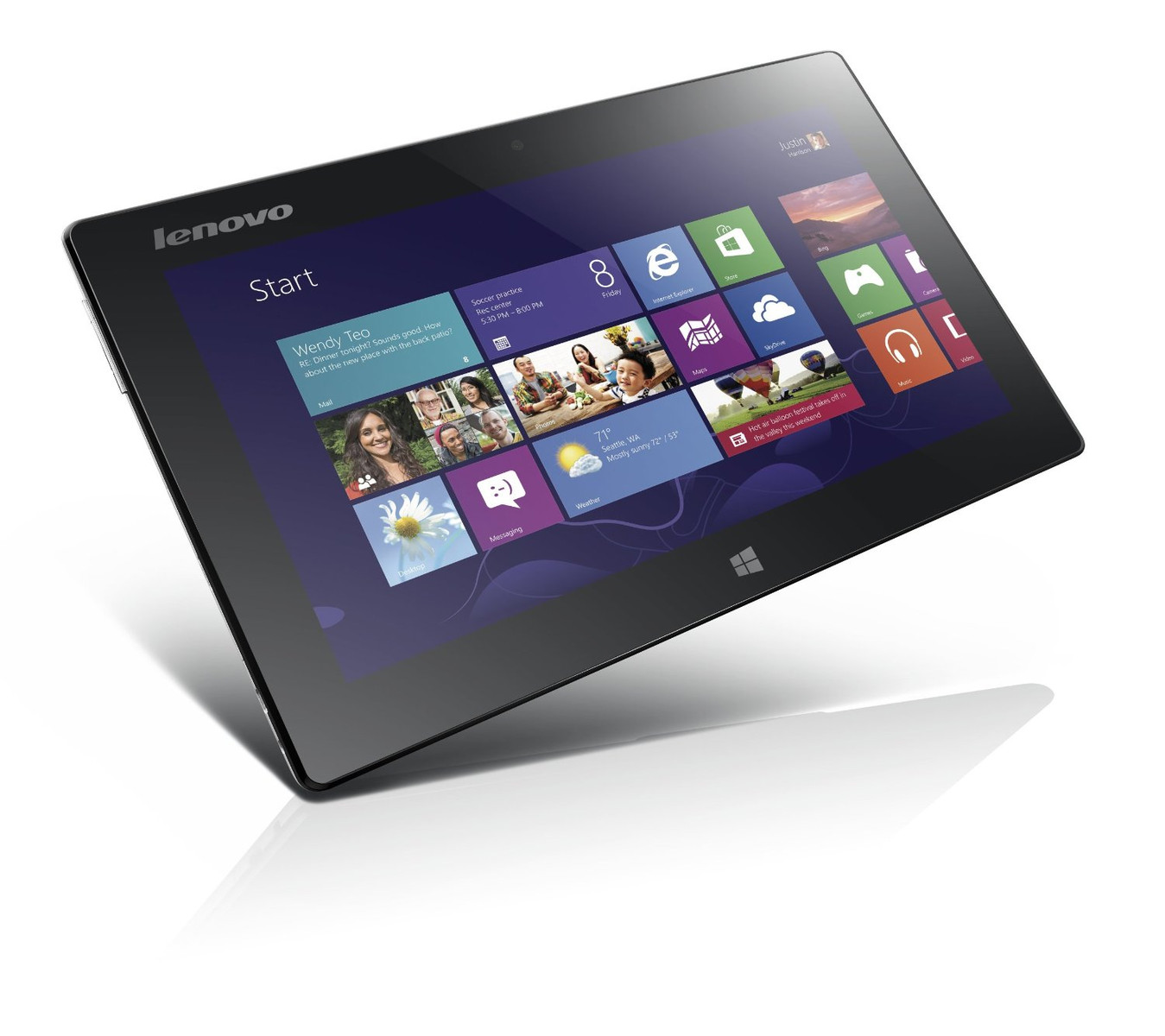
Lenovo IdeaPad Miix 10
This device applied the idea of Chinese manufacturers to make much lightweight Windows 8 tablet from older Windows RT tablets. Luckily they managed to make such a device with only 580g. So it will never be hard to take it with you out. With a large 10.1-inch display comes you defect as battery life is small.Price is 490 euros.


Toshiba Satellite W30t
If you are looking for a hybrid that recalls the Ultrabook, you have found the right one. Toshiba Satellite gives you a very powerful processor, two batteries (for the screen and keyboard) with a excellent display of 13.3 inches and excellent other specifications which can not be given defect. Price is higher rate compared to other devices,it's 770 euros.

Wednesday, April 2, 2014

How to use free proxy on Firefox?

What is proxy?
Proxy helping people to secure these real IP address and private browsing.Same word is saying that Proxy is server from which you can hide your IP address.With proxy you can connect to servers from all World.Example you're from India and want to use USA services,only what you need is good USA proxy address.Connect to proxy is not too much hard but it's simple to connect through
Mozilla Firefox.But be careful,don't use Proxy to cheat.Some sites can detect it...Through this post with pictures you will find the best way to connect on Proxy using Firefox Browser...

Do I need some software?
No,but you need to download extension for Firefox "FoxyProxy".I am so sorry because you need to install add-ons to your browser but that is the only way...

How to download FoxyProxy?
As i said,you first need FoxyProxy extension which you can install by going on official site of FoxyProxy extension and click "+ Add to Firefox" .When you click it Firefox will show at the right top "do you "Allow" to install extension" just click allow and wait until is installed.After is installed they will ask you to restart Firefox as you need to do...

How to use FoxyProxy - Connect to Proxy?
Also is simple.I told you to download FoxyProxy because is the best way.You can connect to proxy with other ways but this is tested by me and easiest.Just do following:
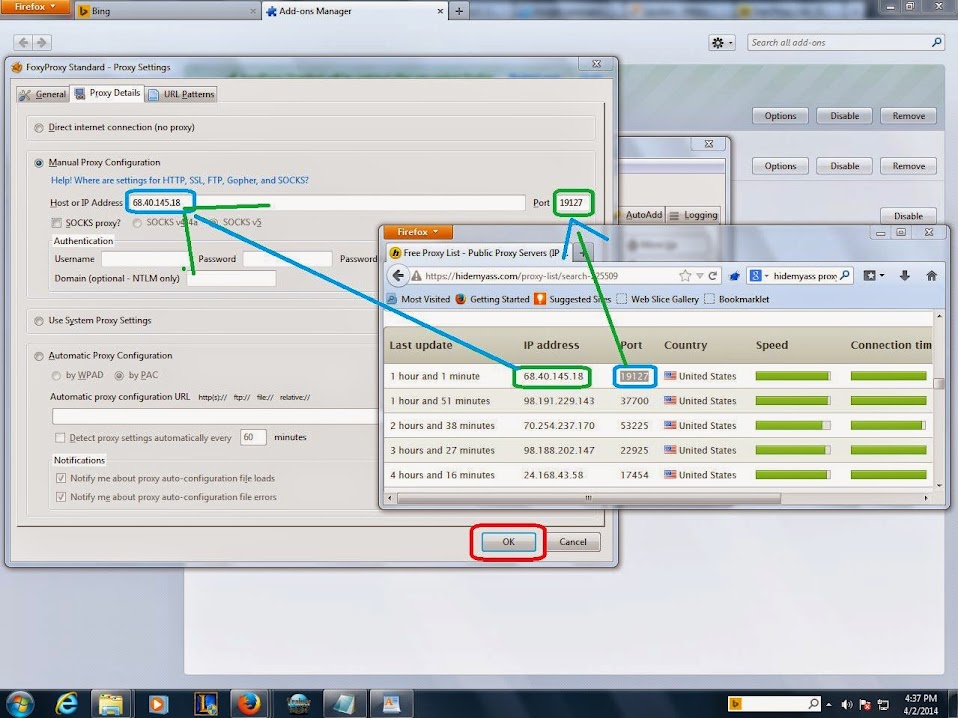
Go to HideMyA*s and find which proxy you need.You will see list of all World's proxies,choose some which you want to connect.

Now open your Add-ons ,click Extensions,find FoxyProxy and click "options"...


All you have to do is click on "Add New Proxy" and fill details from your selected proxy and click "OK". - (HideMyA*s) as is shown on picture:


After do that,you're ready to use proxy...Now click to select mode :"Use proxy (your proxy) and you can close foxy proxy...


Enjoy with secure surfing!
Now you're connected to proxy,congratulations!
You're connected to proxy,now you can use other services and enter to any site!
-Important Notes :
    -To disable proxy,just change to "Default".
    -You can change proxy by right click on browser and select "FoxyProxy Standard"
    -Some sites can detect proxy,be careful!

How to hide files/folders - Windows beginners

Do you have some files or folders but you want to keep them only for you.Windows made options to keep privacy of your files and folders and you can hide them easy without any software.If you use software it will give you only virus.I have 2 brothers and I'm using this option too because I do not want anyone touching my private folders and files.
Now will show you how to do it on Windows 7 which is same as Windows XP way.

Windows7
As I said,Windows is from years in years better and easier to use.You can hide your files without any problem.Just do the following
First of all you need to check your folder as hidden by doing:
Right click on folder and select properties, look at the bottom on "Attributes" and check "Hidden".
Now folder maybe disappear and you need to do following if you want to show it:
Go to Control Panel\Appearance and Personalization\Folder Options
-Now click to "View" and you will find 2 types "Don't show hidden files, folders or drives" and "Show hidden files, folders and drives".
Now need to check what you want,but in this case click "Show hidden files" and click "apply".
All is done!You can see your hidden folders if you want to open it.But when you want to hide them again,do same process but this time just check "Don't show hidden files" and click apply.
Congrats!You files are hidden and no one can see your privacy. Check the other useful posts,Enjoy!

Tuesday, April 1, 2014

Top 5 biriliant ideas to make PC useful

Today on the world are working over 100 billion PCs.PC making our life easier,better and interesting while using his Opportunities which we can`t do it. People spend time at the computer while coding, online searching, playing video games, editing... For some reasons PC suddenly get bored to man and do not know what's going to work on it. Banging your head against the wall  "Why did I bought this?" do not need to be afraid, because you are not wrong,you have no idea what else you can do on a computer and how to make it useful.I was one of you too.I didn't knew what can i do so i made
some searches and came to final Conclusion. I had no one to tell what all I can do on PC. I have written separated and the most important thing you mentioned below. That's why I want to change that,I do not want let other people to be in my situation. Here is the list of 5 great ideas on how to make your PC useful. I call them "brilliant 5".

Make money Online
Making money online is my best way to spend time on PC.You`re maybe surprised and can not believe you can earn money from home.There is no number of ways you can do online for money.Some of them are "doing surveys" which is the best and free.The best of all is you don`t need to pay anything!People like me write online articles on some article sharing sites which needs high content.For making money writing articles you can try website Squidoo.On line have so so so much more ways to earn money for free,but it need hard work.
You can google it,It's your job. I told you what you can do and you have to look for the sites that give such services. And believe me, making money online will never get bored.


Join on Social networks
Social Networks such as Facebook,Twitter,Instagram and more , are popular in the World. Meet other people,find your old friends,follow famous singers,movie stars... Also on the social networks you can find some lessons that others post.Share your feelings,photos from trips.You can play games like
poker on Facebook and compete with others. Social networks are good if you want to spend free time by chatting with others... I can recommend to use Facebook and Twitter.If you want to follow famous people use twitter. If you want to meet new people,play games with them,find friends,chat with them use Facebook.


Learn to code
You maybe love to play games on your PC,use favorite applications and more.Have you ever asked yourself: "How does developers made games and applications?",But the answer is simple but hard to understand: Coding.... But to develop games you need to know so much "Coding languages" and it need hard work and high knowledge so you need to learn so much about : Java,C++,Pynthon,C#,Adobe illustrator,3D modeling and more.These are names of programming languages which you need to know if you want to Develop a PC game.If are you interested,check this book buy it or find online for free "Land of Lisp".or just find free Books or pay for them
online.Google it :). But if you want to develop some easy applications,the best for start is : Visual Basic powered by Microsoft which is so easy to understand (you can find free books online,and online tutorials) But when you learned Visual basic,you can go to learn some other languages which have better features like C++,C#,Pynthon,etc. -But have you ever wished to have yourself site or Blog?No problem because Blogging is so easy because it don't need any code language.Only if you want to have better Template of Blog or if you want to edit your Blog better,you need to know HTML and CSS.Which you can learn on this site where i spent so big time and then made this Blog :) W3 Schools .Also for website,which is more harder to make.You need to know basic rules of HTML and CSS.
Arrange your desktop
Do you have dirty and messy Windows Desktop and you cannot manage with it?Now is the time to use free time and clean and arrange your desktop while deploying folders,deleting useless
files,changing your desktop background in some interesting and that will cheer you up when you turn on PC.Also you can better organize your desktop with this cool shadows way using "Fences" . Downloading and installing fences to your desktop will be clearer and much better with shadow "Fences" .You can add some special gadgets too and docks which will make your desktop brilliant!Good "ObjectDocks" will help you too,another software by "Stardock" you can find more and much better their products!
Paint
Maybe you constantly when you're bored,turn Microsoft Paint and doodle on it.But have you ever asked what can you do more with Microsoft Paint?
Microsoft Paint is like Basic (beginners) Photoshop and It's easy to use.But you can still everything except drawing! You can edit photos,making logos,using shapes on paint,making great design images,etc.
There is also more programs like MC Paint.I love Gimp2 and Paint.NET that are like paint but with many more features!They are also easier to use and can be downloaded for free.


These were 5 brilliant ways to make some pastime on your PC.I use them maybe everyday when I'm free.Also Blogging is my second side and it's so fun to write and help people.
"Arrange your Desktop"and "Paint" are themes that you maybe already used but someone didn't.
I have forgotten to say one more way to spend free time on PC: "Read from TechSpecs" :) .
Have fun!

Monday, March 31, 2014

Check your model,maybe need battery change - Lenovo

Lenovo is China company which makes Laptops,Smartphones,PC, (IT) devices.
You maybe heard about Lenovo ThinkPad Series and you might love it because have so cool design,have good characteristics like transforming to tablets,etc...But there was one to say "small" error during production...
China inventors came
to the conclusion that during the work laptop, caused due to overheating battery that can lead to the fire!


Which models are related to?
The problem is related to the following models:
ThinkPad E Series: Edge 11, Edge 13,Edge14
ThinkPad T Series: ThinkPad T410, T420, T510 and W510
ThinkPad X Series: X100E, X120E, X200, X201 and X201S

Through the official page,Lenovo called all customers who have one of these models is that they come forward to receive a free replacement of the defective batteries to any country! So this news is important because a lot of people don't know for this ,if you have one of these devices, check your battery because it can bring you a lot of damage...

Sunday, March 30, 2014

Windows 7 working Slow? : Free solution

Do you have problem with Windows 7 like slow opening files,much errors,lagging in Games,while surfing web?
Much developers inspired that problem to make some scam "100% PC clean" "Speed up your PC" software to "speed up" but never use or download that!!That will just give you a virus or slow down your PC.
But you can't "speed up PC" your PC's speed depends of Microprocessor's MIPS ,RAM memory,etc.
If you want to speed up your PC,you need big cash to buy better processor,RAM memory and Graphic Card.
But here you come to "speed up" Windows 7 as free way,no PC.No just to speed up.To remove some options (settings) that your slow PC don't need.
______________________________________________________


Windows 7


From years in years,Microsoft making Operating System with more Visual effects,shadows and better design.That is maybe better for people but not for computers of older generation.To run Windows 7 on your PC/Laptop you need minimum:
  • 1 gigahertz (GHz) or faster 32-bit (x86) or 64-bit (x64) processor
  • 1 gigabyte (GB) RAM (32-bit) or 2 GB RAM (64-bit)
  • 16 GB available hard disk space (32-bit) or 20 GB (64-bit)
  • DirectX 9 graphics device with WDDM 1.0 or higher driver
But if you have this minimum retirements,your PC/Laptop will run Windows 7 slow.
______________________________________________________

Solution
?


To remove these slow opening folders,wait long for movies,slow surfing, you will need to disable some Windows7 features such as task bar shadows and visual effects.
To do this process,follow these text and image instructions:


1.Go to Start,look at right of start menu and you will see "Computer". Now right click on Computer and click "properties".


_________________________________________________________________________

2.Now windows will open System folder.You will see at the left top "Advanced system settings"
and click it...


_________________________________________________________________________

3.When you click "Advanced system settings" ,Windows will open another little window which have at top tabs.Now find and click on "Advanced" and click FIRST "settings"
_________________________________________________________________________

4.Windows again open smallest window and showing to us our system visual effects,shadows,etc.
For now I will show you how looks when you make settings for faster Windows,then will explain other later...For Windows faster,choose "Adjust for best performance" (all unchecked) and click "Apply" wait (will take longer time) until Windows make some changes...


_________________________________________________________________________

5.Are you aback?You now see some so much older Windows.Don't worry you have your Windows 7 ,you don't have design,shadows and visual effects from Windows7 which slows down your PC for opening files,watching movies,surfing the Web,etc. "Maybe is better for people,but not better for PC"


6.Of course,you can hold some shadows or visual effects and in same time have better PC by choosing "Custom" .You can check or uncheck what you want.But this first method is the best for your PC...
______________________________________________________

Have i helped you
?


Please write comment if i helped to you.Better to use this method than scam and virus with some software.This is "nature way" to "speed up" your Windows loading,etc.
Type in comment your result....
Happy day with your faster Windows7 !!


Top torrent sites for games

Torrent is one of the popular ways to download from Internet.All what you need is Torrent Application (client) and torrent file which you want to download.
"Pirate" games constitute 40% of all torrent files on the Internet,so that saying have a lot of sites that share torrent games which you can download free.As my every post i write what I experienced and I will give you only sites that I have tested.
_______________________________________________________
_____

Are all torrents a Virus
?


When
we closer look, torrent is not only virus...
Because big popularity of torrent games most sites share "virus" and "scam" games to attract people and download it.BE CAREFUL!The following websites that i will quote here are the only one in which I believe and I think that you will not find any virus.Before all,only if you have a new website, email me and I'll check it.

1.Games Torrents
Site is on Spanish/English language and will stay with you until you stop downloading pirate games!
Also site share games for direct and torrent download.
This site (users on site) share every new PC/XBOX360/PS3/WII/PSP/NDS/PS2 and MAC games!
Very big choice and after all,site is not virus.Just be careful with all torrent sites: "Never click on ads" or if is ad opened in new window,just fast close it.Because of viruses,after every download check comments if someone said is virus!!I think you will enjoy with this site.

Visit Website


2.Torrents Games

If you liked previous site you will like this too.But in this case this site is made in Blog style but with better design and as can i see have games for more consoles!Like PS2,PS Vita and Nintendo 3DS.
Also like for every torrent site "CHECK COMMENTS before download!" i think you remember  :)

Visit Website

3.Amingsnack

Maybe you remembered this design of site and you have seen same as on the previous site (Torrents Games) but this guy helped me a lot in downloading some games where on some sites haven't been.Also is without viruses and most of them are 100% without virus.
In future you will find sites with same design.Visit Website
____________________________________________________________


Is that all
?


Of course is not all.There is so much more sites that exist for free games but i didn't used them.
I am so sorry because i showed only 3 ,But you will like them.
I want
to spare my readers that they do not give them a site where I have never even opened
.
That is all in which i believe and have trust that will not scam me.
Of course,if you have some site that you wanna test (that is not provided in this post) send me mail message to any of the social network.
I think you will enjoy downloading your free games from these sites :)!
Now let the torrent to download your games and we will hang out again in the next posts :).
Happy downloading!

Receive SMS Online

A lot of websites needs phone number verification such as:
Facebook,Gmail,Yahoo,etc. Because they have to protect these sites from spams and Robots.
Some people do not want to enter these personal data on the internet because they are afraid that someone will steal it or use them to abuse purposes.But some people also don't have Phone number or phone number disconnected from service.In this case,there are other services that provide free phone numbers to receive SMS online.
____________________________________________________________

Do I use these sites?

I am like people who hate to enter  phone number,street address,postal code on Internet because all will see where I am.But sometimes when i create some private Mail or Facebook i use my private information to help people to find me.


____________________________________________________________
Have there any rules
?


Services which provide free phone numbers to receive SMS online are usually made according to special rules and special causes such as:
  • Use them when you want to pick your phone number for yourself.
  • Your phone is broken or SIM card is destroyed or not working.
  • You have a phone because you don't You don't have Phone because you don't like fashion...
____________________________________________________________

Popularity of free Phone number online for receiving SMS is growing up and have a lot of sites today which have good services.I will recommend you the best and most secure.So i can friendly suggest you 6 sites that i have used and tested.
Why 6?Because have a lot sites i didn't choose number 6.I have used and tested 6 sites and successfully worked for me.I don't want to give you some that i didn't tested.

1. Receive-sms-online
-For me is easy to use and I'm using it only if i need some phone number from Europe.
They don't have great variety,but still update phone numbers everyday,and have some numbers that other sites don't.

Visit Website


2.
Receivesmsonline

-My the best
because few people use it and they have numbers from USA,UK,CA.
I have verified some Facebook,mail,games accounts using this service.
People usually need sites like this one.

Visit Website


3. Twililo

-Be careful because Twilio coming,the best service from my mind because they also can make you private number if you register and confirm trial account with phone number.So we will use phone numbers from other sites to confirm phone :D .

Visit Website


4.
Receive-SMS
-Receive SMS was first site for phone numbers i used.They post everyday 6 numbers from USA,CA,UK and other countries and all are international!They also can create you private number but only if you pay with paypal $10-$49 .

Visit Website


5.
FreeOnlinePhone
From this service was mine 1st successful confirmed PayPal number.I'm using one of them,but they reload numbers everyday from USA,UK,CA.

Visit Website


6. GRE

I have used this service a lot of times
especially for confirming phone number in some browser games.They have big choice of numbers such as : America (N/S) Asia and Europe.Just be careful there: They have so much ads and don't click them or they will redirect you to another page.
Visit Website

Saturday, March 29, 2014

TechSpecs We're starting - Welcome!

Welcome to TechSpecs.
You might have wondered what was going on in this blog, but you will know after this post.. This Blog is started to help people who have some of the technological problems such as: Computers, Mobile, Internet and Gaming sometimes.All the posts which will be posted here are my knowledge and my full experience to help you in resolving problems.This blog gives tips and advice to  the Completed success.

Hi I am Uros Vukasinovic and I started this Blog to share my knowledge and create great community of people which will talk about topic related to.
I think
it
will be nice to hang out and have fun with great posts you'll find on this Blog.
On
this blog in the capital will see:

News
and Technology:
Computers
Software
Mobile            
Internet
Blogging

and sometimes gamingAlso as you can see Blog is under editorial and It's new.So in the day and day,weeks,weeks will be better and easier to use :).

Enjoy reading TechSpecs! :)

Uros Vukasinovic